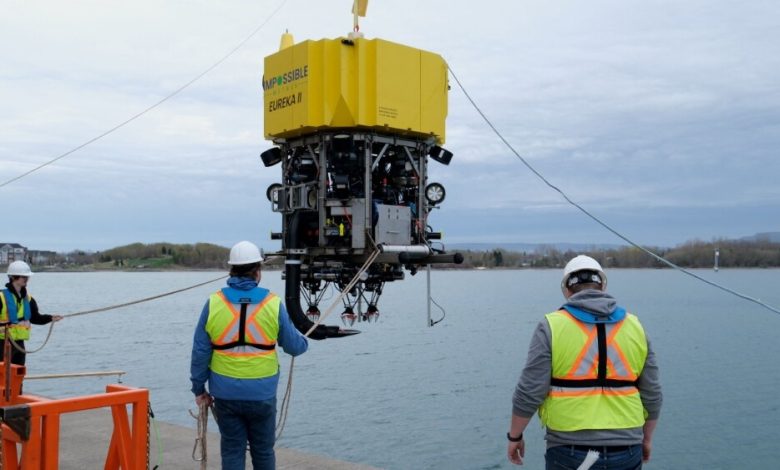
En el fondo de un lago en Canadá, tres brazos robóticos levantan delicadamente grandes guijarros para almacenarlos. Es parte de los ensayos de una empresa que busca cosechar los codiciados nódulos polimetálicos del lecho marino con menos impacto ambiental.
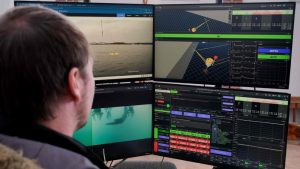
En un laboratorio en la orilla, trabajadores de la empresa Impossible Metals monitorean el gran robot amarillo a través de pantallas y con un control parecido al de videojuegos dirigen sus movimientos.
El prototipo del robot permanece inmóvil en el agua sin tocar el fondo de un lago en Ontario, en el centro de Canadá, donde se realizan los test.
Este es un aspecto fundamental de su tecnología porque permite recolectar nódulos polimetálicos “de una forma selectiva”, sin causar una gran perturbación en el lecho marino, explica a la AFP el cofundador de Impossible Metals, Jason Gillham.
Las pruebas pretenden demostrar que el robot podrá cosechar a varios miles de metros de profundidad en los océanos nódulos polimetálicos, formados durante milenios y ricos en algunos de los metales más codiciados en el planeta: Níquel, manganeso, cobalto y cobre, entre otros.
Con un tamaño parecido al de una papa grande, los nódulos son muy demandados porque sus minerales son fundamentales en la transición energética y se emplean en la producción de baterías para autos eléctricos, celulares, cables eléctricos, entre otros.
Impossible Metals, fundada en California en 2020, fue la primera empresa en solicitar la autorización del presidente Donald Trump para usar esta tecnología en aguas estadounidenses cerca de Samoa, en el océano Pacífico.
En esta industria en crecimiento, otras empresas como la canadiense The Metals Company usan maquinarias gigantes que ruedan en el fondo de los océanos y succionan los nódulos, sin preocuparse por el ecosistema marino. Se trata de una técnica muy cuestionada.
En abril, esta compañía fue la primera en hacer una solicitud de explotación minera en aguas internacionales ante autoridades estadounidenses, pese a que es la Autoridad Internacional de los Fondos Marinos quien tiene esa jurisdicción y que Estados Unidos no integra la institución.
DAÑOS AMBIENTALES. El objetivo de Impossible Metals es recolectar solo los nódulos y suministrarlos a empresas que quieren evitar que sus productos sean vinculados con los daños ambientales.
En las profundidades, su robot prende las luces y con cámaras e inteligencia artificial distingue los nódulos de la vida marina, como huevos de pulpos o corales.
Con ello disminuye en parte el riesgo de impacto ambiental, reconoce el biólogo marino, Douglas McCauley, de la Universidad de California en Santa Barbara.
Los métodos convencionales recogen todo el lecho marino usando maquinarias que se parecen “un poco a excavadoras”, explica.
El material recolectado se traslada a barcos, donde los nódulos son separados de los residuos, que se devuelven al mar. Esto crea largas “plumas” de sedimentos y toxinas con múltiples impactos potenciales, explica.
Y los propios nódulos albergan organismos vivientes y al removerlos, inclusive con una técnica selectiva, “están destruyendo un hábitat”, enfatiza McCauley.
Impossible Metals admite que su tecnología no puede reconocer la vida microscópica, pero asegura que su política es dejar intacto el 60% de los nódulos.
McCauley es escéptico porque los “ecosistemas en el fondo del océano son especialmente frágiles y sensibles”. “La vida allá abajo se mueve muy lento, así que se reproducen muy lento, crecen muy lento”.
“Tampoco conocemos lo suficiente la biodiversidad ni el ecosistema” de esas zonas, agrega Duncan Currie, de la coalición de conservación Deep Sea. Solo se conocen 250.000 de los dos millones de especies que se calcula habitan los océanos, según la fundación científica Ocean Census.
MINERÍA MARINA
La minería “siempre tendrá algún impacto”, afirma el director ejecutivo y cofundador de Impossible Metals, Oliver Gunasekara, con mucha experiencia en el sector de semiconductores.
Pero “necesitamos muchos más minerales esenciales, ya que queremos electrificarlo todo”, afirma.
Como muestra de la fiebre global por la minería marina, Impossible Metals recibió 15 millones de dólares en inversiones para construir y probar una primera serie de su robot Eureka 3 en 2026. El robot será “completamente autónomo” y podrá propulsarse solo, sin cables o amarres a la superficie. Mientras espera la autorización de Estados Unidos, la compañía aspira a terminar de desarrollar esta tecnología en hasta tres años, realizar pruebas en el océano, construir una flota y operar a través de alianzas en todo el mundo.
JOHN WONG