¿Bebé quemado con estufa? IPS rechaza denuncia y alega un cuadro de infección

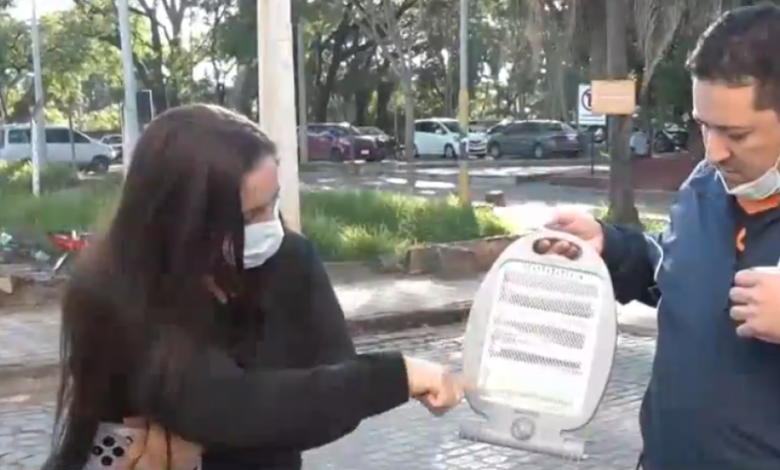
Tras la denuncia de una supuesta quemadura por estufa de un bebé de ocho meses, las autoridades del Hospital Central del Instituto de Previsión Social (IPS), en conferencia de prensa, desmintieron y negaron el hecho. Médicos alegaron que las lesiones en el rostro y tórax corresponden a una infección, denominada vasculitis infecciosa.
El Dr. Osvaldo Aquino, jefe del Servicio de Cirugía Plástica Reconstructiva y del Quemado del Hospital Central, aseveró que la lesión no corresponde a ningún tipo de quemadura, pero sí a un cuadro infeccioso.
“Las lesiones no corresponden a ningún tipo de quemaduras. Más bien son de tipo infeccioso. Así que puedo certificar que no tiene ninguna zona quemada”.
El bebé presenta alteraciones tipo epilepsia, según informaron los médicos, y el ingreso al Hospital Central fue por un cuadro respiratorio, debido a que se agravó la enfermedad; por ello fue derivado a terapia intensiva. Hoy, su diagnóstico es una infección, llamada vasculitis infecciosa. Incluso nació con anomalías del corazón.
“Entre ellas, está la vasculitis infecciosa, que es la lesión en piel. Es la traducción en la piel de lo que es un proceso infeccioso grave. Aparte de la falla multiorgánica, que hace referencia al colapso del sistema cardiovascular y respiratorio. Todo eso hace que nuestro niño hoy sea un paciente muy complejo”, explicó la Dra. Cristina Ghezzi, jefa de Pediatría.
Tras la denuncia del caso, que ocurrió el fin de semana, el IPS comenzó las verificaciones del paciente. Con relación a las lesiones en la piel, alegaron que es parte del proceso evolutivo de la enfermedad infecciosa conocida como vasculitis.
El doctor Rodrigo Aquino, del Servicio de Cardiocirugía del Hospital Central, refirió que debido a que nació con malformaciones ya fue operado en dos ocasiones, una de ellas a los 18 días de nacimiento. Explicó que la infección respiratoria es una de las complicaciones de la cirugía cardiaca.
“Él realmente presentaba varias anomalías del corazón y esta cirugía era justamente para tratar de mejorar esa parte. Por supuesto, este procedimiento tampoco está exento de que puedan presentarse complicaciones en el futuro. Entonces, una de las más frecuentes es la aparición de una infección respiratoria tras la intervención”.
El cardiocirujano coincidió con los otros médicos, de que las lesiones son infecciones severas.
Tras darse a conocer la denuncia a través de los medios, el IPS inició una auditoría médica y una auditoría de enfermería. También anunciaron que se pusieron a disposición del Ministerio Público, atendiendo a que la familia realizó la denuncia en la Fiscalía.
Con relación al pedido de la estufa, el doctor Hugo Martínez, director médico del Hospital Central, alegó que solicitaron por los días de intenso frío. Afirmó que UTI cuenta con calefacción, pero en algunos casos los pacientes requieren estufas, para darles más calor.
¿Qué denunciaron los padres?
Según los padres, el pequeño sufrió quemaduras a causa de una estufa que compraron los familiares a pedido de enfermeras, para usarla en la sala de internado en la Unidad de Terapia Intensiva (UTI) en el Hospital Central. A causa del uso incorrecto, el bebé sufrió quemaduras en el rostro, denunció a través de Telefuturo Carmen Ojeda, la madre del bebé.
Desde el IPS alegaron que hablaron con los familiares y realizaron la contención emocional.
“Realmente es una situación muy difícil, sobre todo desde lo familiar, tener un hijo en estas circunstancias. Más que el pronóstico médico en sí, lo que impacta es el momento que estamos atravesando, probablemente derivado de las complicaciones propias del procedimiento quirúrgico y del contexto actual de enfermedades respiratorias, que pudo haber sido el desencadenante de toda esta situación”, expresó el doctor Hugo Martínez, director médico del Hospital Central